Userface shows the result at every level: a whole screen, a single component, each of its states. Built-in diagnostics check the styles and design system compliance.
Userface App
Userface is a desktop app for building product interfaces with an AI agent.
It connects to a local repository and works in its code: the agent builds an interface from scratch or extends an existing product using its components and styles. The result appears on screen right away and is checked against the design system's rules.
Status
Active development
Role
Author, Product Design Engineer
Domain
AI tools, Developer tools
Product model
System
Work starts by connecting a local repository. Userface reads its contents — applications, components, styles, fonts — and hands them to the agent as material for the task.
On request, the agent creates a new component, changes an existing one, or composes a full screen.
The agent's edits are gathered in one place: they can be reviewed, accepted, or rolled back.
AI chat
The agent is directed from the chat — the app's left panel. The model runs inside a harness that renders the result and runs the checks after every edit.
Task
A task starts in whatever form is convenient: text, voice, or an image.
The chat knows the project. A component can be mentioned with @ — the agent receives its description: properties, states, and usage rules. Clicking an element in the preview makes that element the target of the next change.
Control
Before working, the agent shows a plan — it can be approved as a whole or step by step.
The agent's freedom is tuned to the task: ask for confirmation always, only for risky actions, or never. A separate strict mode won't let the task close: the agent keeps refining the result until it displays and passes the design system check.
A task lives in a thread: every action is visible there, and the project can be returned to any restore point. Parallel tasks run in separate threads.
Models
The built-in models are OpenAI's GPT-5 family, from fast to the most capable. Reasoning depth is adjustable: from quick answers to the most thorough agentic work.
You can also plug in your own: an OpenAI or Anthropic key, a local model via Ollama, or any compatible server. With a local model, all the code stays on your machine.
Playground
Applications, components, typefaces, files, and the agent's edits open live in one window — the Playground.
Surface
Everything opens in one of three views: preview, code, or change comparison.
The screen works like a browser: tabs, back and forward navigation, one address bar for files, apps, components, and typefaces.
- Userface starts the project's application itself and opens it as in a browser — with an address, navigation, and reload.
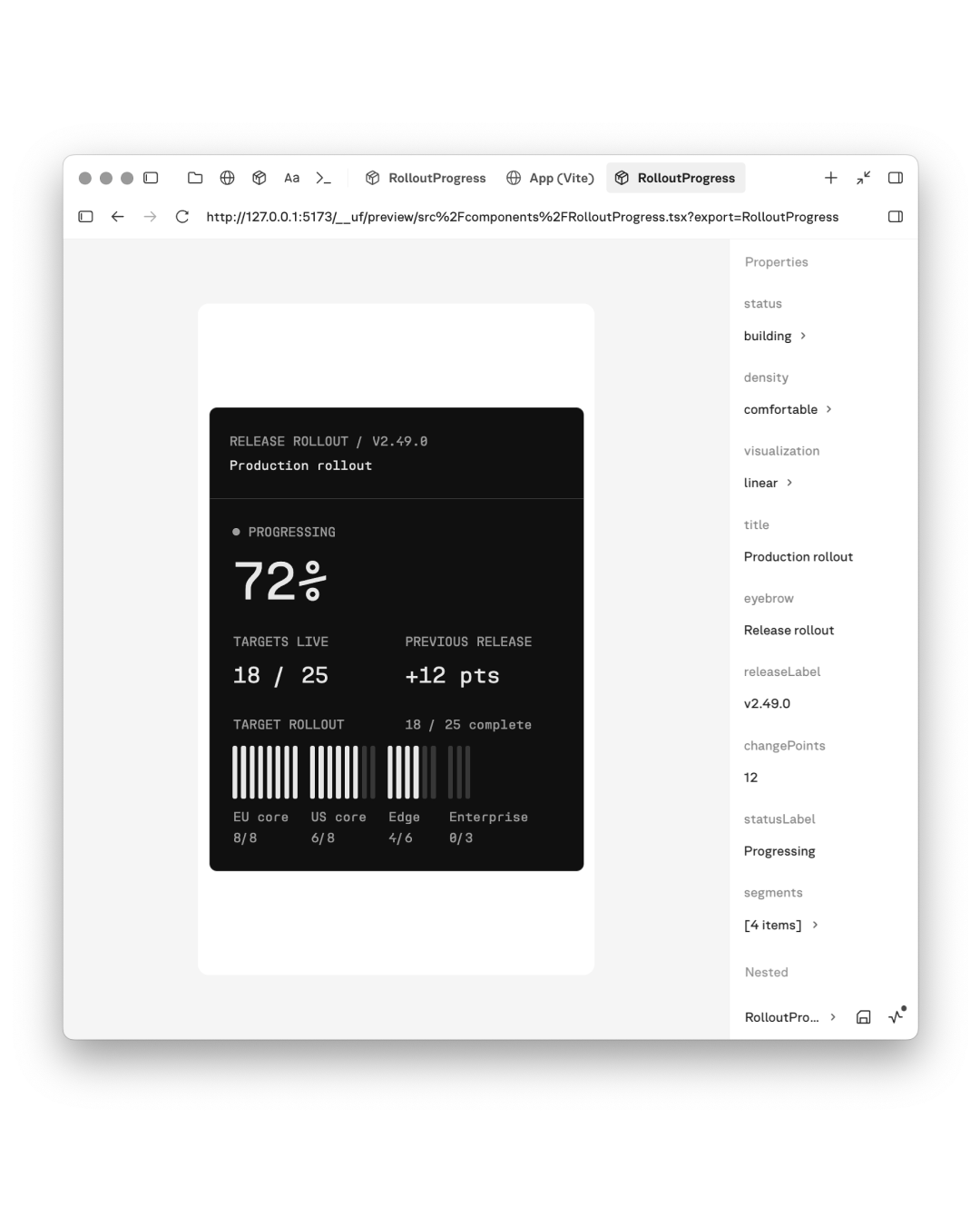
- A component opens on its own, apart from the rest of the interface: properties change in a panel beside it, and states switch with one click.
- If a component cannot be shown, the Playground explains why and suggests a fix.
- A typeface opens as a specimen page: sample text, individual characters, and language support.
- Files open as code, and the terminal works right there.
- The agent's edits open as a before-and-after comparison; they can be accepted, sent back for revision, or rejected.

Technology
Under the Playground runs the Userface Engine. It analyzes the project's code and automatically composes a face contract for every component — a description both the app and the agent understand: properties with their allowed values, states, and usage rules.
The properties panel, the component's ready-made states, and the automatic checks are all built from the contracts. The agent reads the same contract before making edits, so it does not invent properties and stays within the project's design system.
The app, the agent, and the checks use the same descriptions, so the interface rules apply the same way everywhere.
Diagnostics
Built-in diagnostics check the project against the design system.
The report shows the state in numbers: how many components are covered by contracts, where colors and styles are set by hand instead of the design system's tokens, and which problems need fixing first. Findings can be handed straight to the agent — it fixes them right from the report.